> For the complete documentation index, see [llms.txt](https://docs.hyperflash.xyz/llms.txt). Markdown versions of documentation pages are available by appending `.md` to page URLs; this page is available as [Markdown](https://docs.hyperflash.xyz/using-bots/using-market-making-bot.md).
# Using Market-Making Bot
Comprehensive instructions for configuring and using the MM bot to execute automated market making strategies on your preferred trading pairs.
### Overview
The Market Making (MM) bot is designed to provide liquidity by placing orders on both sides of the order book. It automatically manages your positions while adhering to your risk parameters and participation targets. The bot operates in real-time, analyzing market conditions and executing trades based on your configured strategy.
***
### Bot Configuration
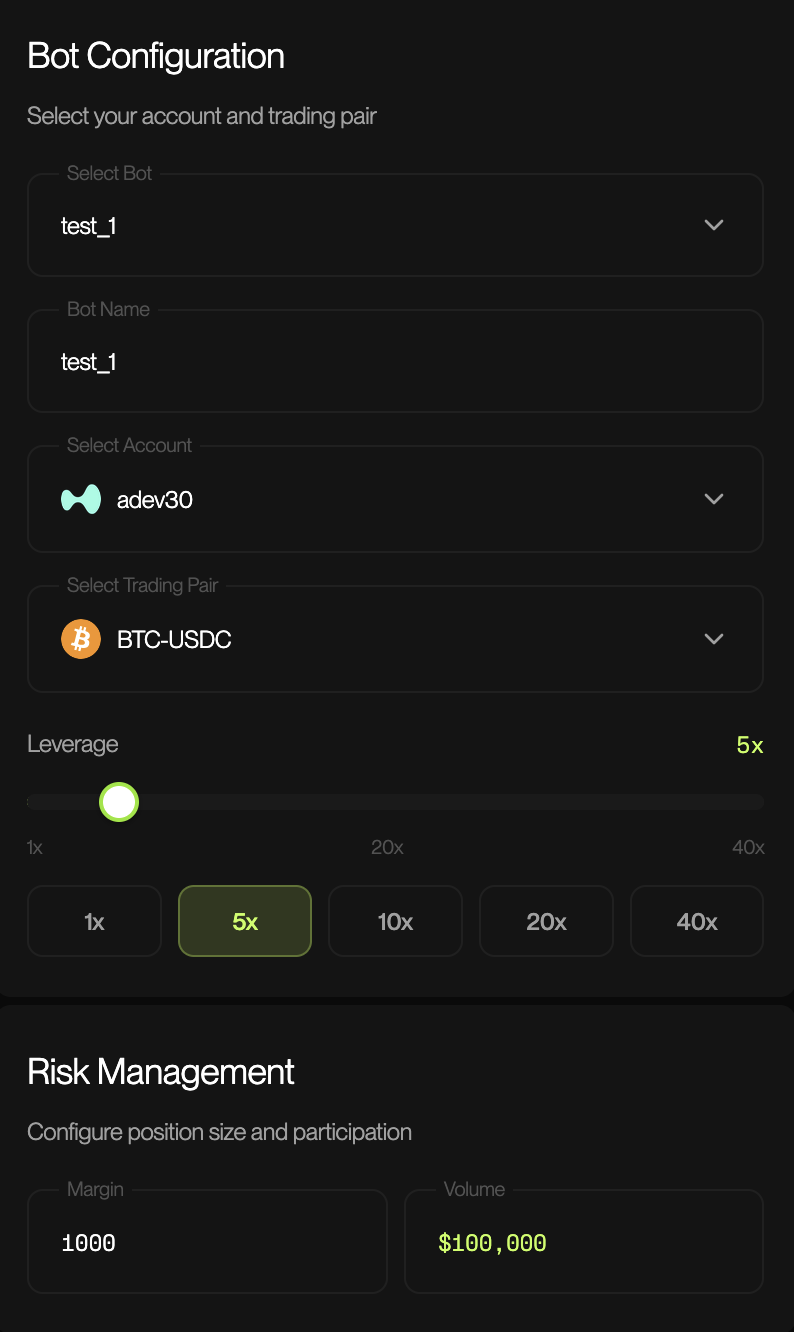
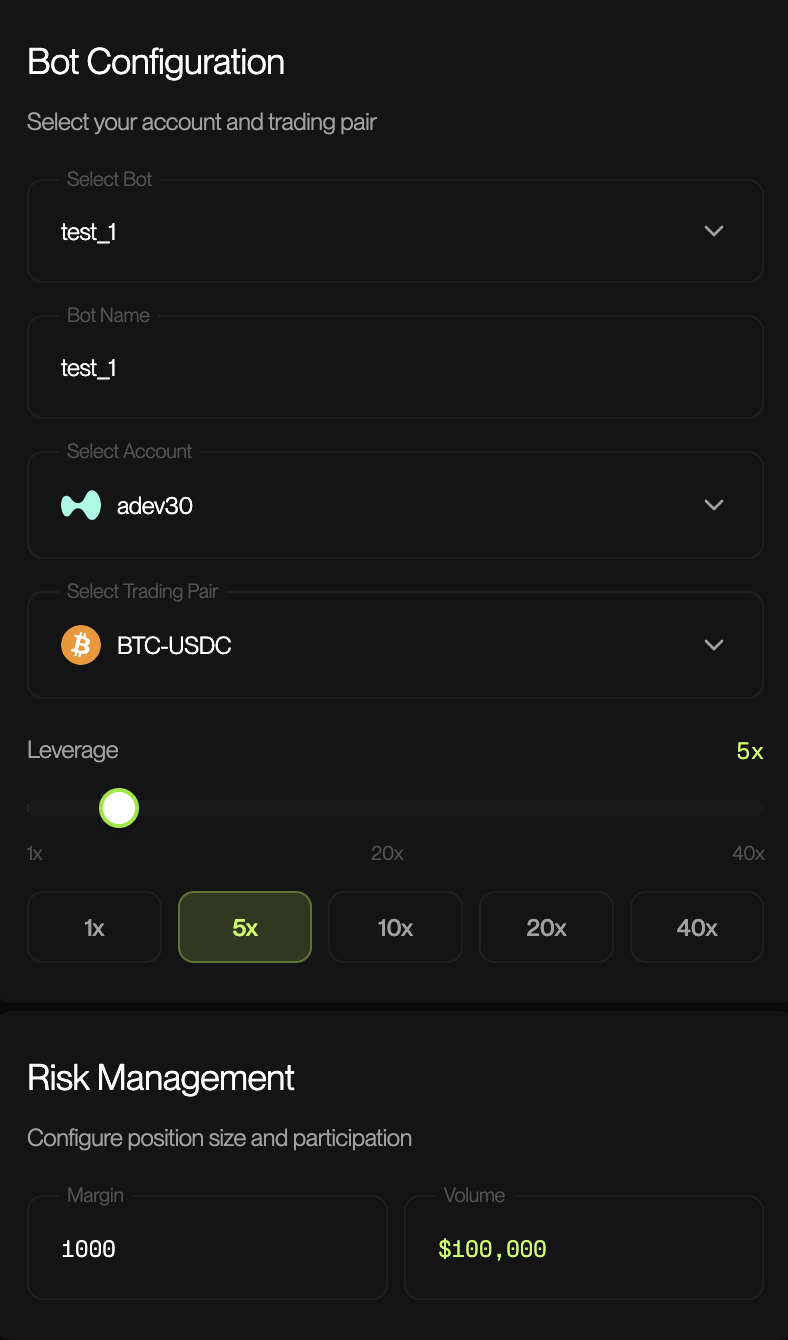
Bot Configuration panel is where you define the fundamental parameters for your trading bot.
#### Create New Bot or Select Bot
Create new bot or choose from your pre-configured bot templates. Each bot can have different settings and can be named and saved for quick deployment.
#### Select Account
Choose the trading account that will be used for executing trades. Hyperflash allows integration of multiple wallets and linked perp dexes for quick access in one place
#### Select Trading Pair
Choose the cryptocurrency pair you want to trade. Exchange specific pairs like HIP-3 assets are also available.
#### Leverage
Select the multiplier applied to your margin to increase position size and potential returns (or losses).
| Setting | Description |
| --------------------- | ---------------------------------- |
| **Range** | 1x to 40x (varies by trading pair) |
| **Available Presets** | 1x, 5x, 10x, 20x, 40x |
| **Slider** | Fine-tune between preset values |
**Note**: Higher leverage amplifies both gains and losses. At 5x leverage with $10,000 margin, you can control a $50,000 position. However, a 20% adverse move would result in a 100% loss of your margin.
> ⚠️ **Warning**: Higher leverage significantly increases liquidation risk. Only use leverage you fully understand and can afford to lose.
***
### Risk Management
Configure your position size and participation parameters to manage exposure.
#### Margin
Enter the amount of collateral allocated to this bot from your account balance.
* **Field**: Numeric input
* **Unit**: USDC (or base currency)
* **Description**: Determines the maximum capital at risk. Combined with leverage, this sets your maximum position size.
#### Volume
The maximum notional value of trades the bot can execute.
* **Field**: Numeric input (auto-calculated based on margin and leverage)
* **Description**: Sets the upper bound on total trading volume. At 5x leverage with $10,000 margin, your maximum volume would be $50,000.
***
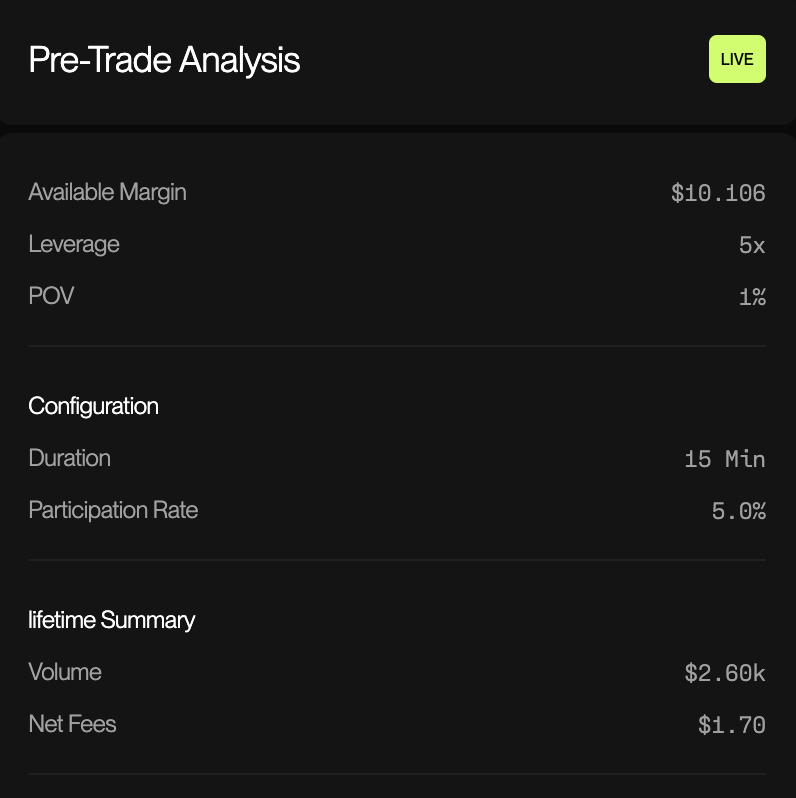
### Pre-Trade Analysis
The Pre-Trade Analysis panel provides a real-time summary of your configuration before you start trading.
| Parameter | Description | Example Value |
| ------------------------------ | -------------------------------------------------------- | ------------- |
| **Available Margin** | The actual margin available in your account for this bot | $10,106.12 |
| **Leverage** | The leverage multiplier you've selected | 5x |
| **POV (Percentage of Volume)** | Your target share of market volume | 1% |
#### Configuration Summary
| Parameter | Description | Example Value |
| ---------------------- | ------------------------------------------------------------------- | ------------- |
| **Duration** | Estimated duration the bot will run before automatically stopping | 20 Min |
| **Participation Rate** | The percentage of available trading opportunities the bot will take | 5.0% |
#### Lifetime Summary
| Parameter | Description | Example Value |
| ------------ | ------------------------------------------------- | ------------- |
| **Volume** | Total volume traded by this bot over its lifetime | $100.60k |
| **Net Fees** | Total fees paid or earned through trading | $100.70 |
***
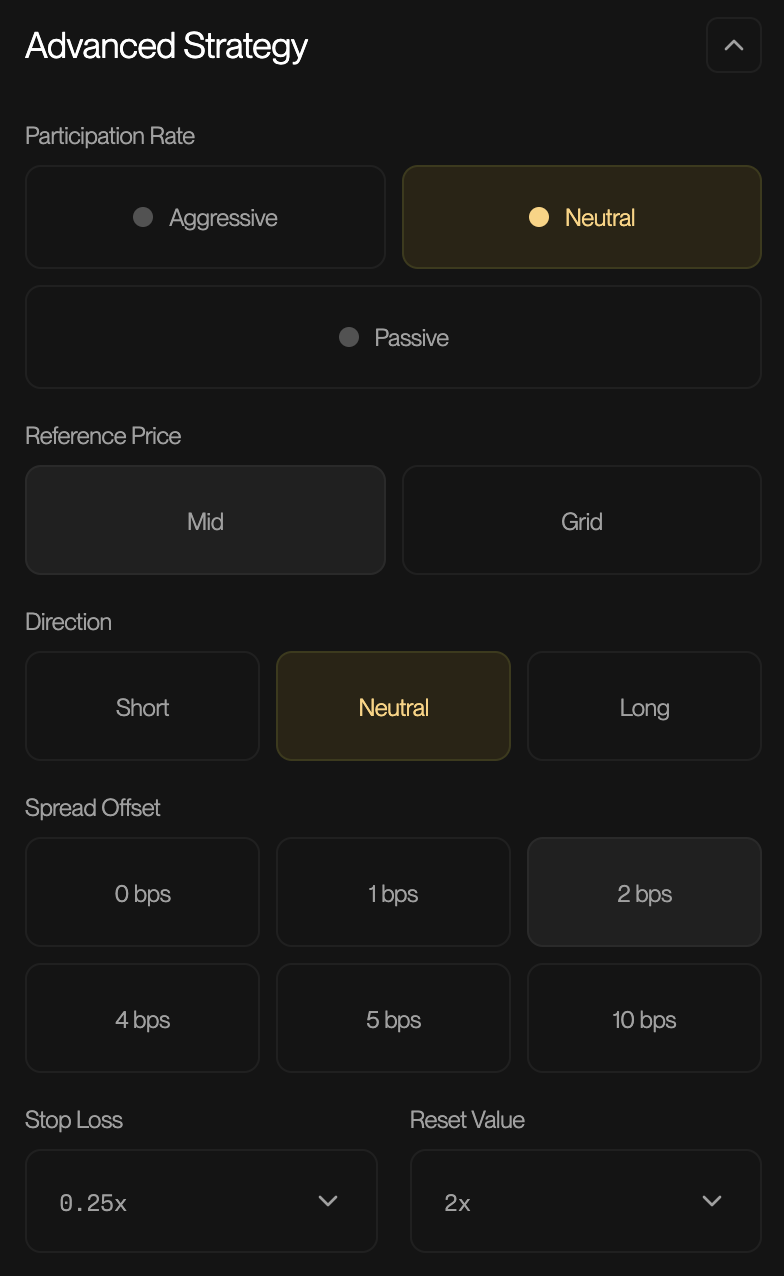
### Advanced Strategy
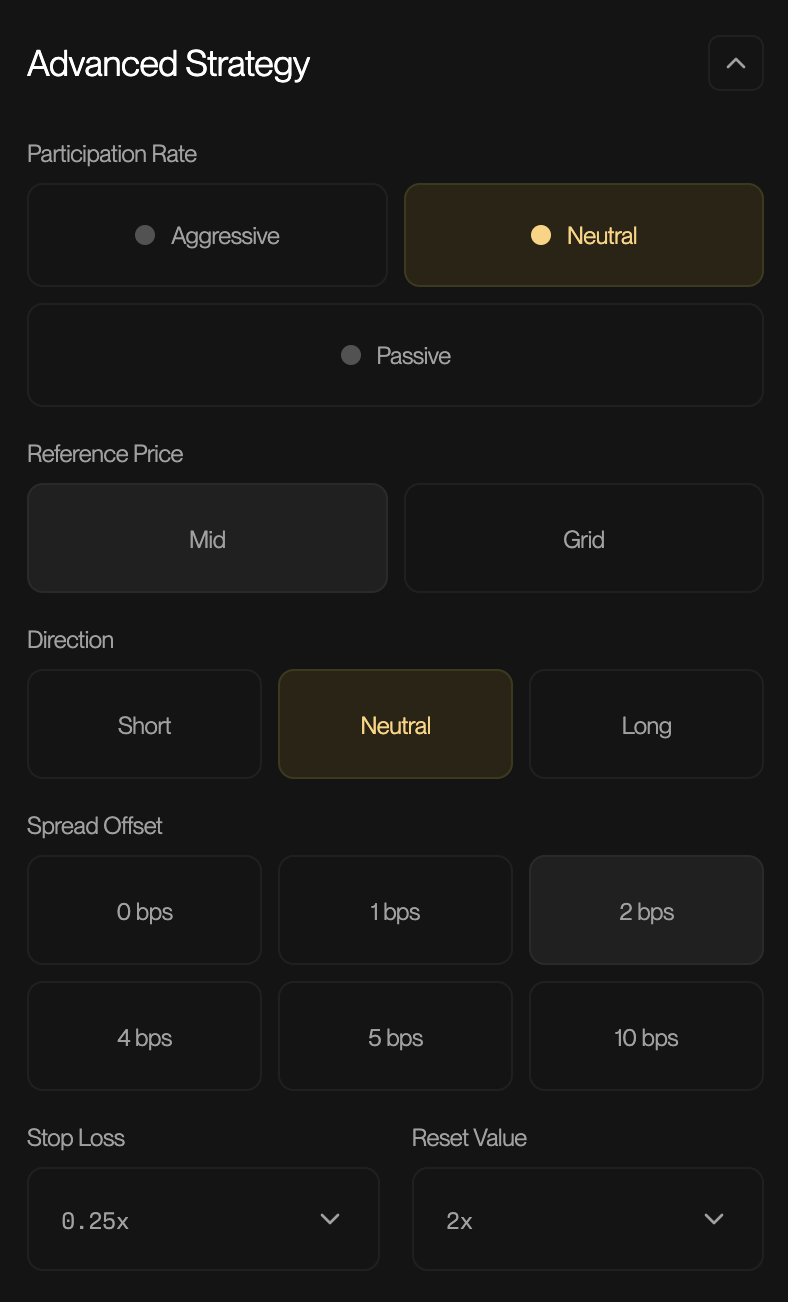
The Advanced Strategy section allows fine-tuned control over the bot's market making behavior.
#### Participation Rate
Controls how aggressively the bot participates in market activity.
| Option | Description |
| -------------- | ---------------------------------------------------------------------- |
| **Aggressive** | Higher participation rate, more frequent trading, captures more volume |
| **Neutral** | Balanced approach between volume capture and risk management |
| **Passive** | Conservative participation, fewer trades, lower exposure |
**Default**: Neutral
#### Reference Price
Determines how the bot calculates the fair value price for placing orders.
| Option | Description |
| -------- | ------------------------------------------------------------------------------------ |
| **Mid** | Uses the midpoint between best bid and best ask as the reference |
| **Grid** | Uses a grid-based pricing model that distributes orders across multiple price levels |
**Note**: Mid pricing is simpler and works well in stable markets. Grid pricing can capture more spread in volatile conditions but requires more careful configuration.
#### Direction
Sets the trading bias for the bot.
| Option | Description |
| ----------- | -------------------------------------------------------- |
| **Short** | Bot will have a bearish bias, preferring short positions |
| **Neutral** | No directional bias, balanced long and short exposure |
| **Long** | Bot will have a bullish bias, preferring long positions |
**Default**: Neutral
**Note**: Use directional settings when you have a market view. Neutral is recommended for pure market making without directional speculation.
#### Spread Offset
The additional spread added to your quotes beyond the market spread, measured in basis points (bps).
* **Field**: Option menu (0 bps, 1bps, 4bps, 5bps, 10bps)
* **Options**: Spread Offset (e.g., 0 bps, 1 bps, 2 bps, 4 bps, 5 bps, 10 bps)
* **Example**: At 0.2 bps (0.02%) spread offset, the bot fill orders within that margin of your quote
**Default**: 2 bps
**Note**: Higher spread offset means wider quotes, reducing fill probability but increasing profit per trade. Lower spread offset increases fill probability but reduces margin per trade.
#### Stop Loss
The maximum loss threshold before the bot automatically closes positions and stops trading.
* **Field**: Dropdown selector
* **Options**: Multiplier of margin (e.g., 0.25x)
* **Example**: At 0.25x with $10,000 margin, the bot will stop if losses reach $2,500
#### Reset Value
The threshold at which the bot resets its position tracking and starts fresh.
* **Field**: Dropdown selector
* **Options**: Multiplier (e.g., 2x)
* **Description**: Helps manage position drift over extended trading periods
***
### Starting and Stopping the Bot
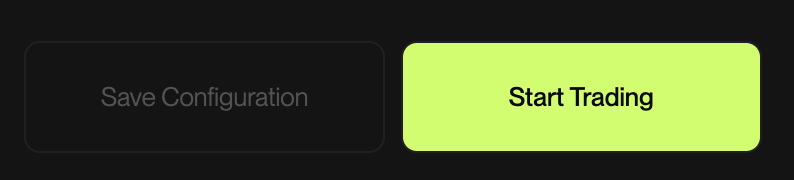
#### Save Configuration
Click **Save Configuration** to store your current settings for future use without having to starting the bot.
#### Start Trading
Click **Start Trading** to activate the bot with your current configuration. The bot will begin executing trades immediately based on your parameters.
> 📝 **Note**: Ensure you have reviewed all settings carefully before starting. The bot will use real funds from your selected account.
***
### History
The History section displays a log of all trades executed by your bots.
| Column | Description |
| ----------- | ---------------------------------------- |
| **TYPE** | Order type (MM = Market Making) |
| **MODE** | Execution mode (Normal, etc.) |
| **PAIR** | Trading pair (e.g., BTC) |
| **Account** | Account used for the trade |
| **Fees** | Fees paid or received |
| **RPNL** | Realized Profit and Loss |
| **SPREAD** | Spread captured on the trade |
| **FILLED** | Amount of the order that was filled |
| **STATUS** | Current status (Completed, Active, etc.) |
| **ACTIONS** | Available actions for the trade |
#### Filtering
Toggle **Active Bots Only** to filter the history to show only currently running bot trades.
***
### Example Trades
#### Example 1: Conservative BTC Market Making
**Scenario**: You want to start market making on BTC-USDC with minimal risk while learning the platform.
**Configuration**
| Parameter | Value | Rationale |
| ---------------------- | -------- | ------------------------------------------- |
| **Trading Pair** | BTC-USDC | High liquidity pair for safer market making |
| **Leverage** | 1x | No leverage to minimize liquidation risk |
| **Margin** | $1,000 | Small capital allocation for learning |
| **Participation Rate** | Passive | Lower frequency to observe bot behavior |
| **Reference Price** | Mid | Simple pricing for stable conditions |
| **Direction** | Neutral | No directional bias |
| **Spread Offset** | 5 bps | Wider spread for higher profit per trade |
| **Stop Loss** | 0.25x | Stop at $250 loss |
| **Reset Value** | 2x | Reset after significant position buildup |
**Expected Outcome**
* **Maximum Position Size**: $1,000 (1x leverage × $1,000 margin)
* **Maximum Loss Before Stop**: $250
* **Trading Style**: Infrequent trades with wider spreads
* **Best For**: Learning the platform, low-volatility periods
**Execution Flow**
1. Bot places bid and ask orders around the mid price with a 5 bps spread
2. When orders fill, bot captures the spread as profit
3. Bot maintains near-neutral inventory by balancing buys and sells
4. If losses reach $250, bot automatically stops
***
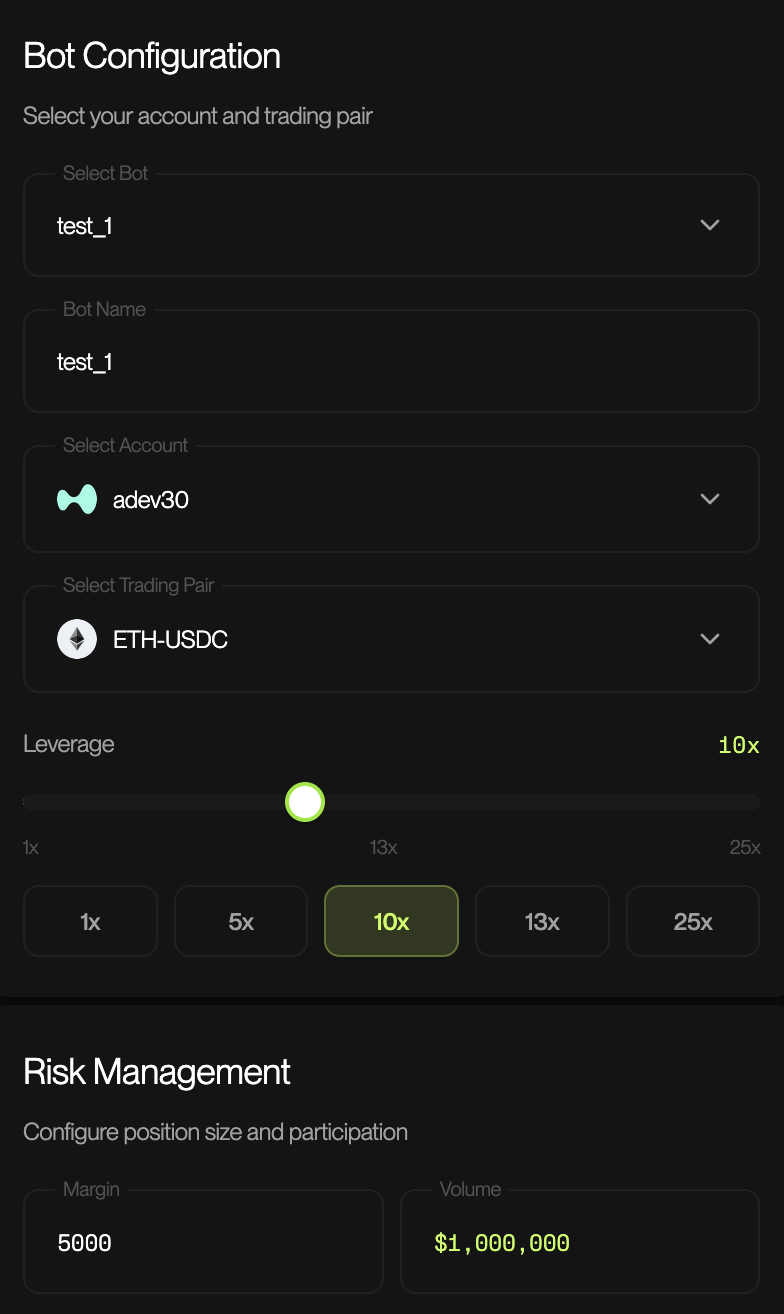
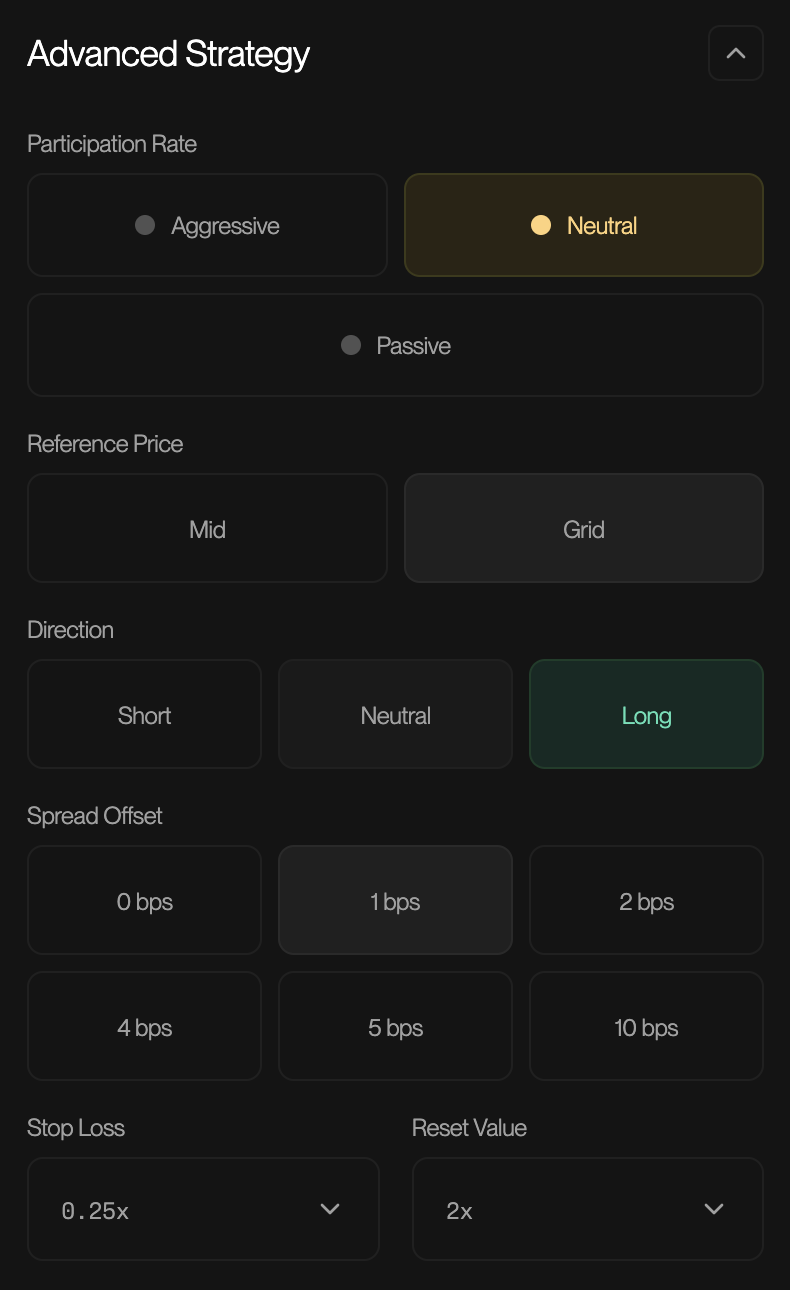
#### Example 2: Aggressive ETH Market Making
**Scenario**: You're an experienced trader who wants to maximize volume capture on a volatile trading session.
**Configuration**
| Parameter | Value | Rationale |
| ---------------------- | ---------- | -------------------------------------------- |
| **Trading Pair** | ETH-USDC | Volatile pair with good liquidity |
| **Leverage** | 10x | Higher leverage for larger position capacity |
| **Margin** | $5,000 | Moderate capital allocation |
| **Participation Rate** | Aggressive | Maximum volume capture |
| **Reference Price** | Grid | Multi-level orders for volatile markets |
| **Direction** | Long | Bullish bias based on market analysis |
| **Spread Offset** | 1 bps | Tight spread for higher fill rate |
| **Stop Loss** | 0.25x | Stop at $1,250 loss |
| **Reset Value** | 2x | Standard reset threshold |
**Expected Outcome**
* **Maximum Position Size**: $50,000 (10x leverage × $5,000 margin)
* **Maximum Loss Before Stop**: $1,250
* **Trading Style**: Frequent trades with tight spreads, long bias
* **Best For**: Trending markets with clear direction
**Execution Flow**
1. Bot places multiple order levels using grid pricing
2. Long bias means bot holds longer inventory, benefiting if price rises
3. Aggressive participation captures more of the available volume
4. Tight 1 bps spread increases fill probability
5. If losses reach $1,250, bot automatically stops
> ⚠️ **Warning**: This configuration carries significantly higher risk:
>
> * 10x leverage means a 10% adverse move could liquidate your position
> * Directional bias exposes you to losses if the market moves against your view
> * Aggressive participation increases exposure to rapid market moves
***
### Best Practices
1. **Start Small**: Begin with low leverage and small margin to understand bot behavior
2. **Monitor Actively**: Watch your first few trading sessions closely
3. **Use Stop Losses**: Always configure appropriate stop loss levels
4. **Match Strategy to Market**: Use passive strategies in stable markets, more aggressive in trending markets
5. **Review History**: Regularly analyze your trade history to optimize settings
6. **Diversify**: Consider running multiple bots with different configurations across pairs
***
### Troubleshooting
| Issue | Possible Cause | Solution |
| ----------------------- | ----------------------------------- | --------------------------------------- |
| Bot not filling orders | Spread offset too wide | Reduce spread offset |
| Excessive losses | Leverage too high | Reduce leverage, tighten stop loss |
| Low volume | Participation rate too passive | Increase to Neutral or Aggressive |
| Rapid inventory buildup | Directional bias in wrong direction | Switch to Neutral or opposite direction |
***
### Glossary
| Term | Definition |
| --------------------- | --------------------------------------------------------------------- |
| **Basis Point (bps)** | 1/100th of a percent (0.01%) |
| **Leverage** | Borrowed capital used to increase position size |
| **Margin** | Collateral deposited to open and maintain positions |
| **Market Making** | Providing liquidity by placing orders on both sides of the order book |
| **POV** | Percentage of Volume - your share of total market volume |
| **RPNL** | Realized Profit and Loss from closed positions |
| **Spread** | The difference between bid and ask prices |
| **Stop Loss** | Automatic position closure at a predetermined loss level |
***
*For additional support contact our support team.*